Broadband RF scanner revisited
I have previously blogged about doing RF surveys using software defined radio. The most interesting aspect to me has been to inventory the business of the different WiFi channels, in order to not clash with neighbouring access points.
I’ve now written better software for doing these surveys.
2.4GHz is a mess (overlapping channels), has much less spectrum, and goes through walls more than 5GHz worth. There’s also a bunch of other crap on 2.4GHz polluting the airwaves, including microwave ovens. So if you’ve thought about this at all, you know to stay off of 2.4GHz.
It’s tempting to get a QuadRF in order to add more dimensions to the 5GHz RF survey, but so far I’ve resisted buying this particular toy.
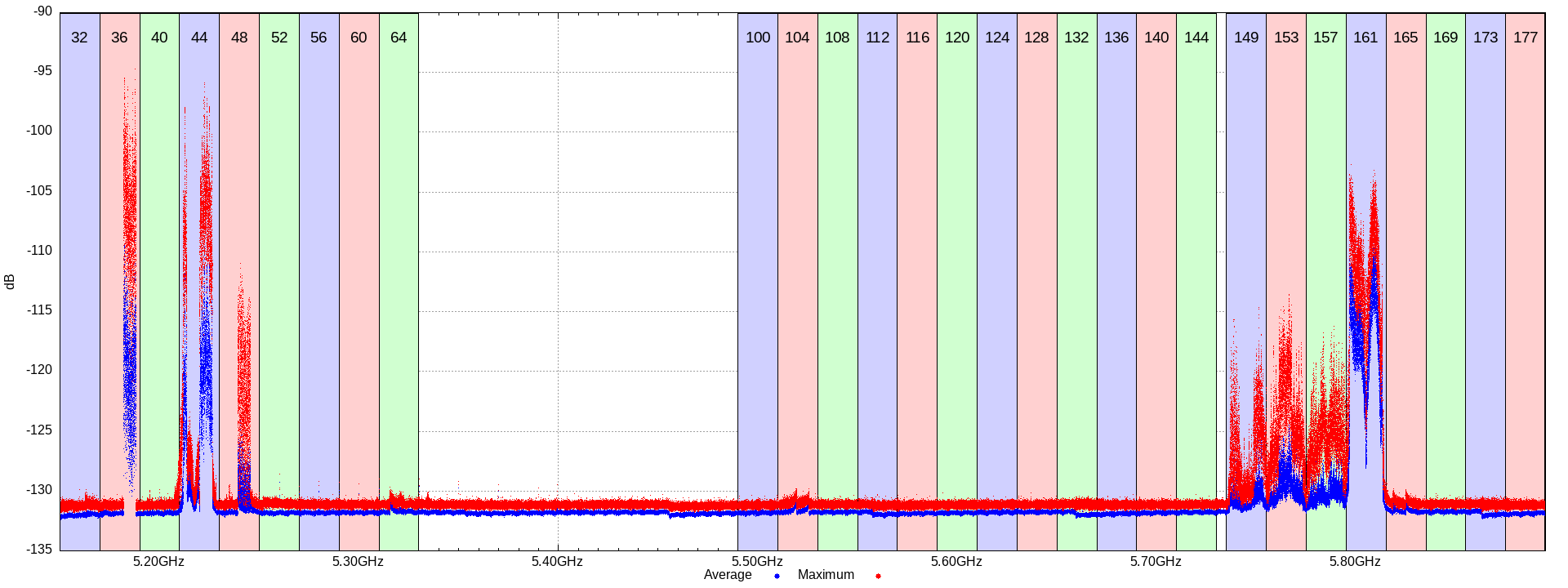
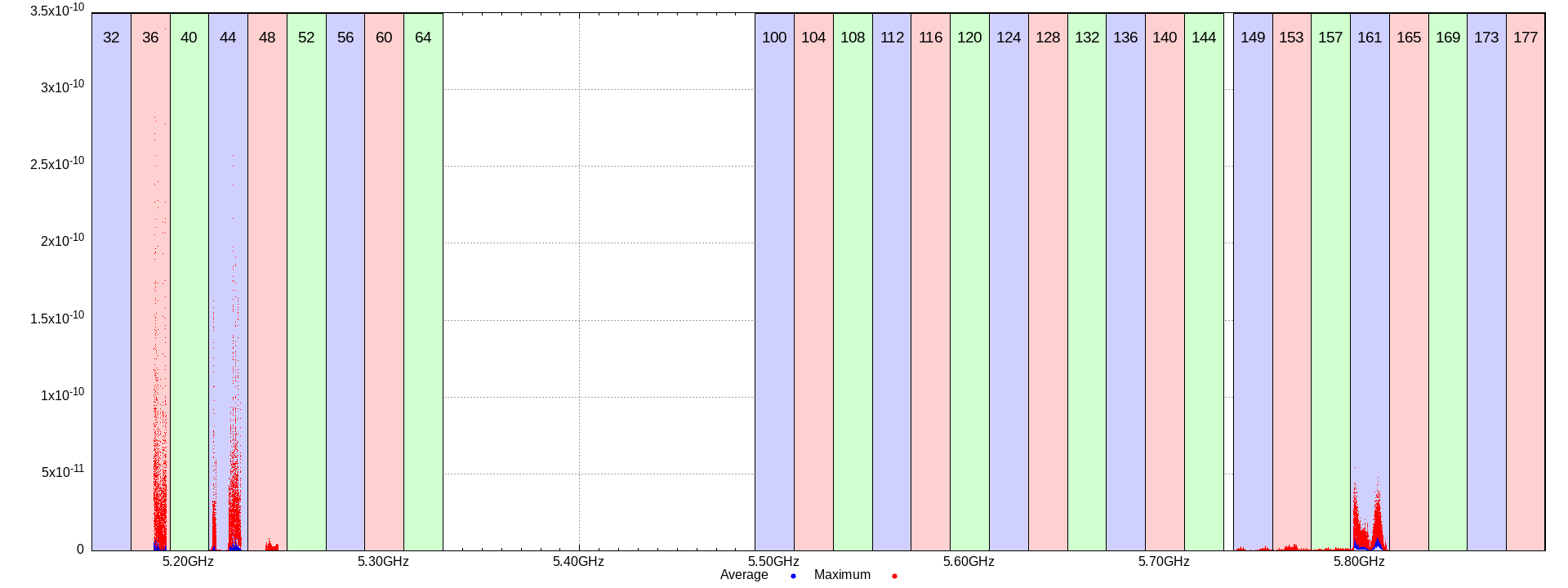
I’m plotting the spectrum power in both dB and linear. With linear scale the busyness really pops.
2.4GHz
As expected, this is a mess:
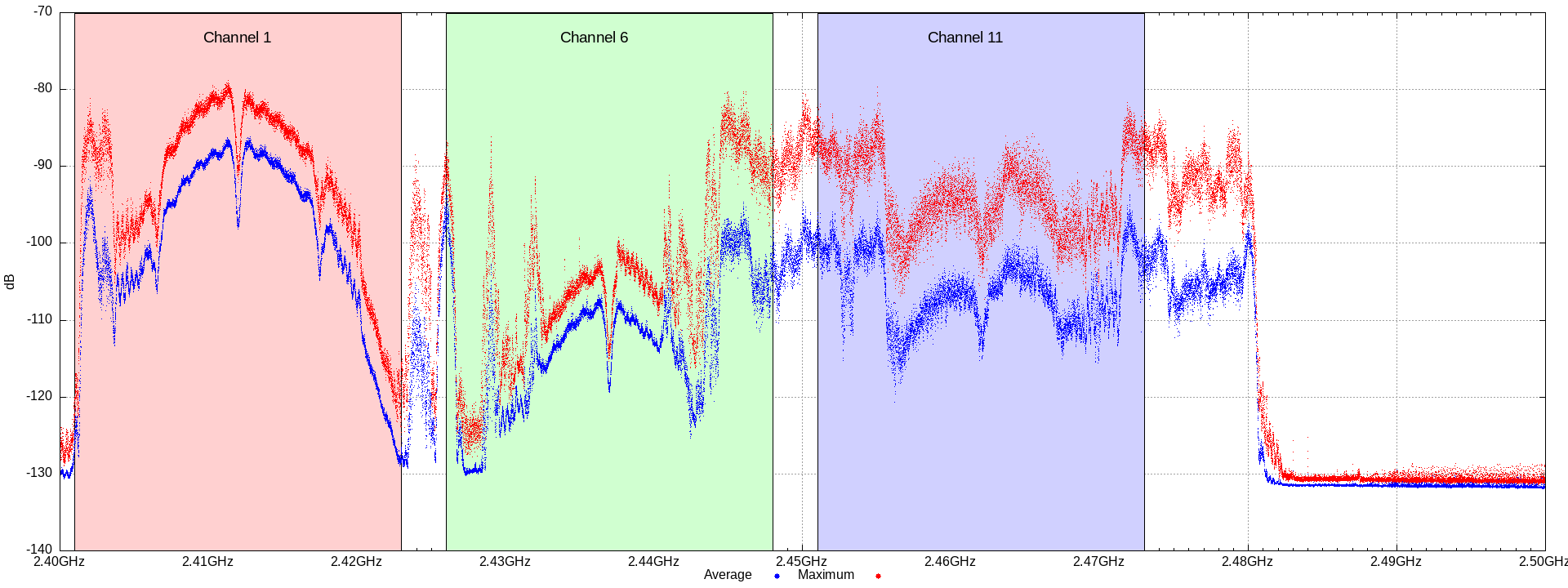
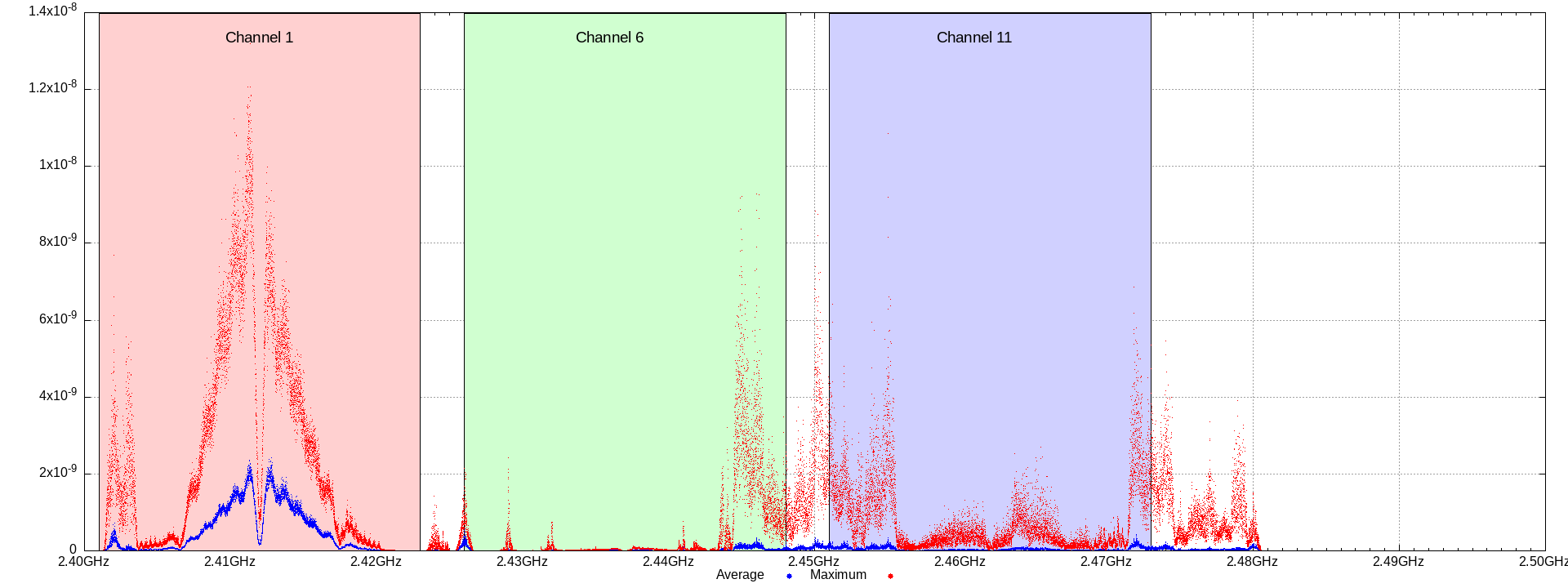
There’s even a bunch of noise between the channels. Is it microwaves? Or someone running the 1/5/9/13 channel split? No, if anything it looks like channel 14, which is not legal here.
5GHz
The 5GHz spectrum is better, but it’s more complicated. The legal channels vary by spectrum, and I won’t even go into the problem of the DFS channels today.
But for a list, including what’s U-NII-3 etc, see List of WLAN channels on Wikipedia.
Background traffic
Busy
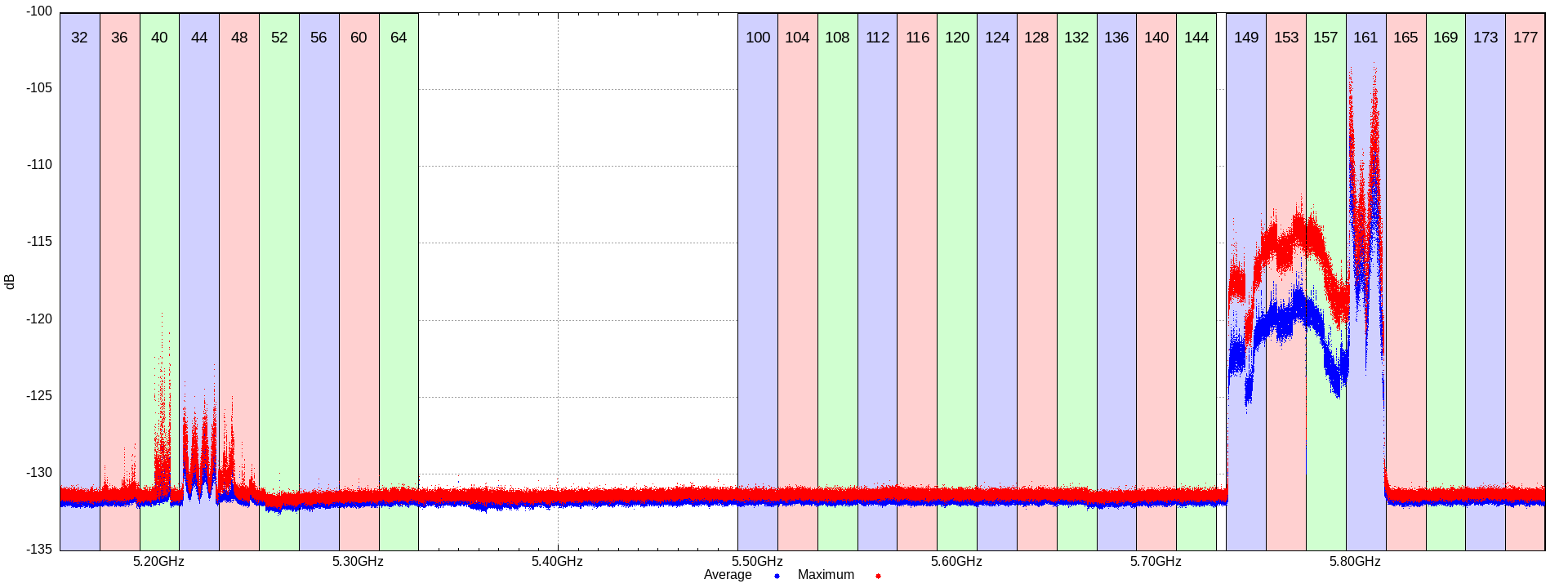
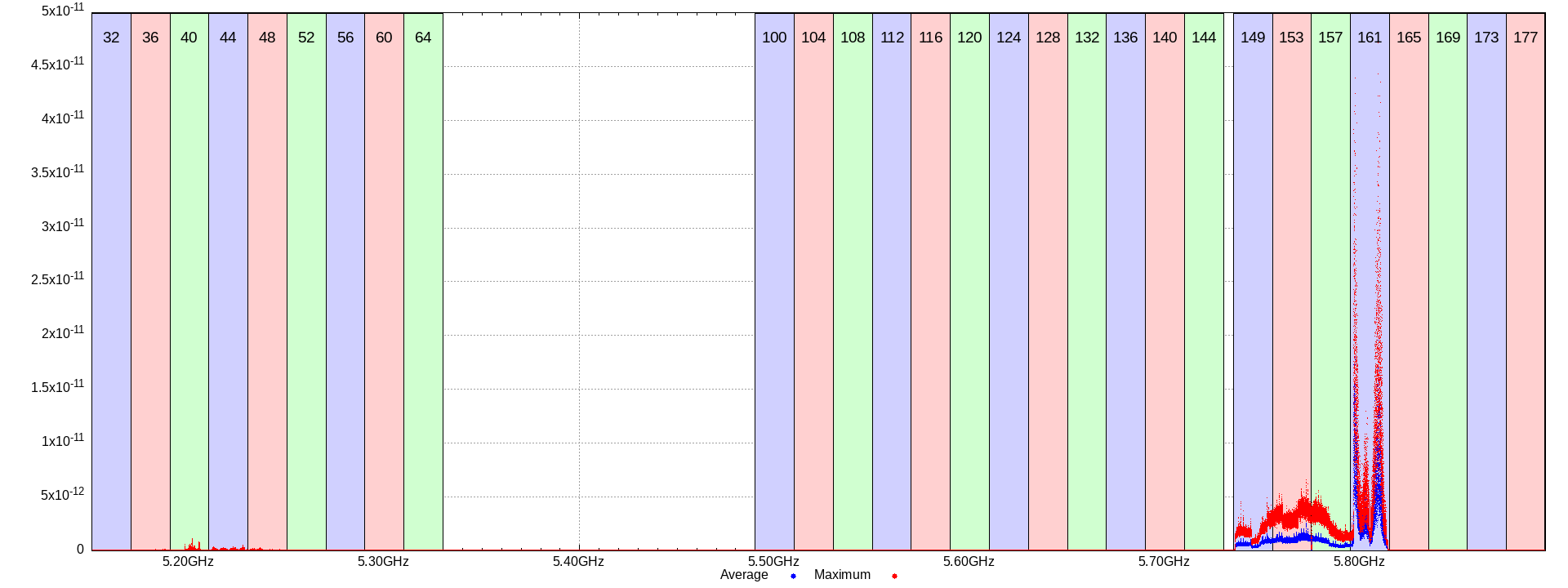
As a power WiFi user I started using U-NII-3 channels (149-165) as soon as they became available here. On Ubiquiti access points you configure it as channel 161, and increase the spectrum width. So you could say that I’m using 80MHz channel 155. But (and this rings a bell having read up on this before), it actually uses only the primary channel, unless a node is requesting more bandwidth. So channel 161 is the more busy 20MHz, and channel 149, 153 and 157 are the secondary 20MHz chunks.
We can see a very different usage across the four channels, both when busy and
when running iperf to generate some network load.
It is a bit weird that the peak power is not the same across the channels. Sure, I can see the average being higher on channel 161, but why is the maximum lower?
Maybe it’s because a bunch of other devices, not part of my “generate some load” test, are chatting along just on channel 161?
U-NII-3
The newer extension enabling 80MHz channel 155 in the UK is not supported by all devices. For example, my Pixelbook can sometimes see the network, but when connecting it’ll go “oh shit, that’s not allowed in the UK” (which it is), and disconnect.
I tried tracking down if this can be fixed with a firmware update, but while I believe it’s technically possible, the company that has the ability to replied that it “can’t” be done. I’m pretty sure it “can’t” be done solely for business reasons, but even if that’s true, it doesn’t change the fact that I hit a brick wall and it’ll never happen for the Pixelbook.
Some other devices can’t connect, but they’re low bandwidth devices and it’s fine to stick them in the 2.4GHz swamp.
Running an RF survey
You’ll need a USRP B200 or other UHD device. I’ll accept patches adding other hardware too.
cargo install --locked rf-survey
rf_survey \
        --start-frequency 5.15G \
        --stop-frequency 5.895G \
        --summarize \
        -o power-5GHz.txt
[… run it for several minutes, then press ctrl-C  …]
git clone https://github.com/ThomasHabets/rf-survey
gnuplot -e 'survey_data="power-5GHz.txt"' rf-survey/band.plot
display wifi-db.png wifi-power.png
6GHz
I’ve not yet started using WiFi 6E. Only my phone supports it, so there’s not much point. Also the USRP B200 only goes to 6GHz, so I’d need a downconverter or a different SDR to do a survey.
I’m unlikely to buy the more-than-slightly more expensive USRP X410 for this. And even a downconverter looks too expensive, as just the mixer is almost $2000.
Looks like Cross Technologies has a downconverter for “just” $1745.
Possible future work
Now that I have a UHD driver that works in WASM, I should be able to build a web based RF survey tool that doesn’t require any installed software at all.
WASM is really cool. Expect more on this.